Local ADS-B  ·  1090 MHz  ·  iPhone / iPad / Apple TV / Mac

The sky above your antenna.

Download on the App Store $4.99 · One purchase · iPhone + iPad + Apple TV + Mac

◆ Featured on RTL-SDR.com

Overhead 1090 connects to the ADS-B receiver on your own network and turns it into a live 1090 MHz radar picture of everything flying over your house — the moment it's broadcast. No accounts. No subscription. No aircraft data ever leaves your home.

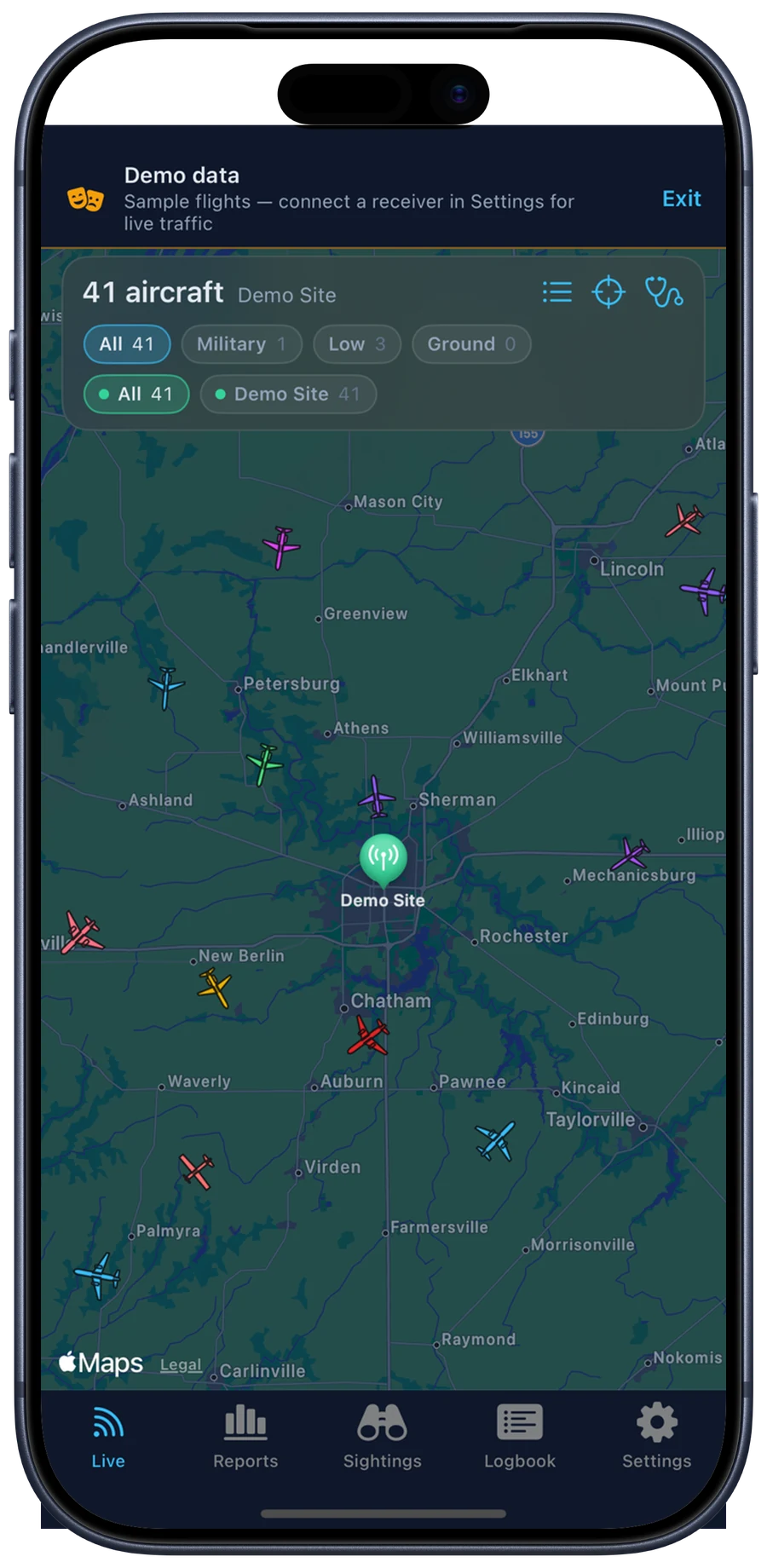
Overhead 1090 on iPhone: sample aircraft on a dark map around a demo receiver site, with military, low-altitude and ground filters
Shown on iPhone 17 Pro · demo-mode capture
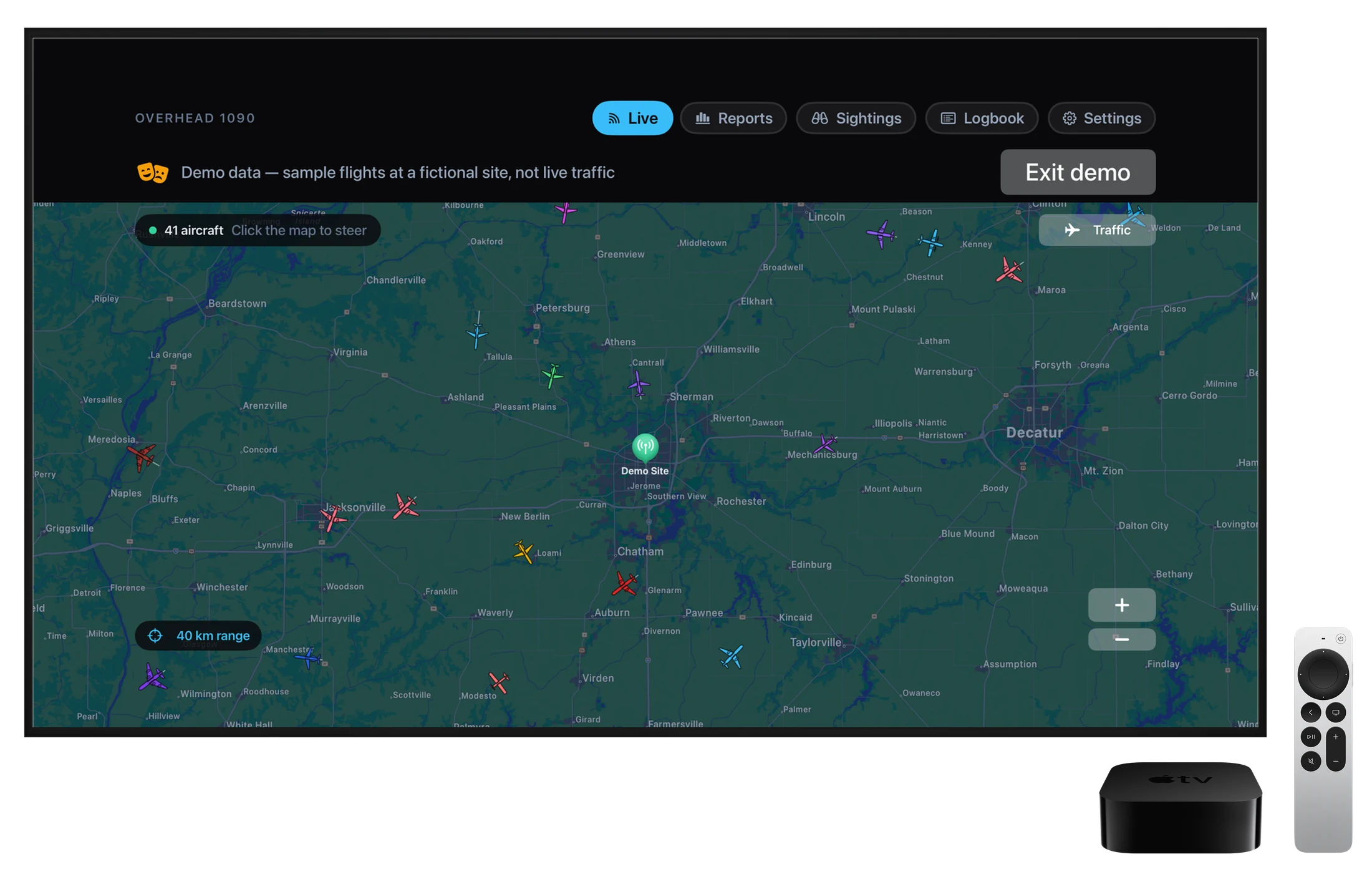
OVERHEAD 1090 — APPLE TV · LIVE TAB RECEIVING
Overhead 1090 on a television with Apple TV 4K: a full-screen dark map with sample aircraft, floating traffic button and zoom controls
Live aircraftEvery target the receiver hears, with headings and type-coded icons.
One-tap filtersMilitary, low-altitude and on-ground chips — plus one per receiver.
Receiver on the mapYour antenna is the pin. Everything is distance-from-you first.
Demo mode includedThese captures are the built-in demo at a fictional site. Your sky stays on your devices.

Actual interfaces — demo-mode captures with sample data at a fictional location

New · Mac

Now on your Mac. Free if you own it.

One purchase covers iPhone, iPad, Apple TV and Mac. Already bought Overhead 1090? Open the Mac App Store and it's yours.

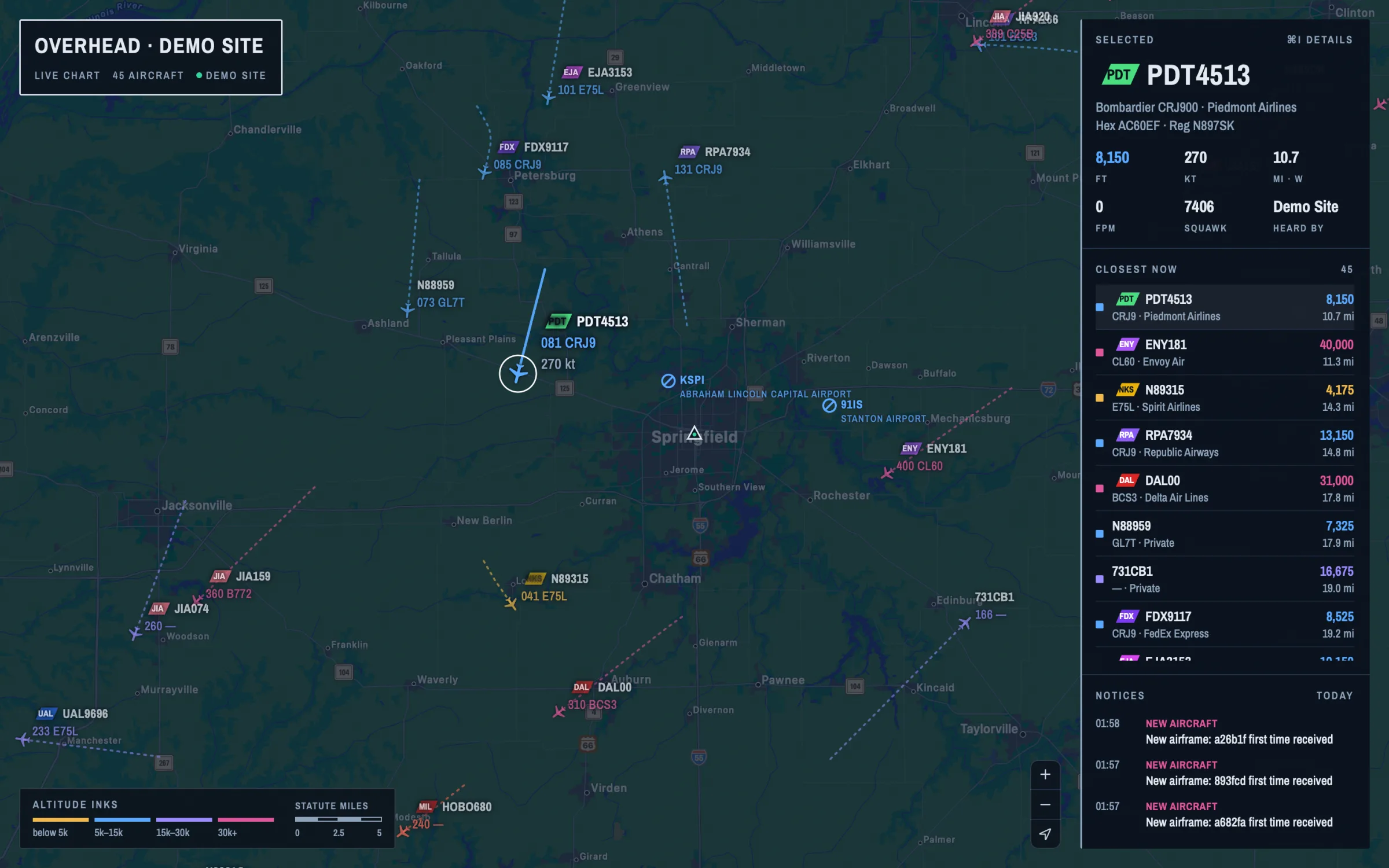
OVERHEAD 1090 — MAC · LIVE CHART RECORDING
Overhead 1090 on Mac: a full-window night-sectional map with 45 sample aircraft around a demo site, a selected Piedmont CRJ900 with its altitude, speed and squawk, and a Closest Now list beside it
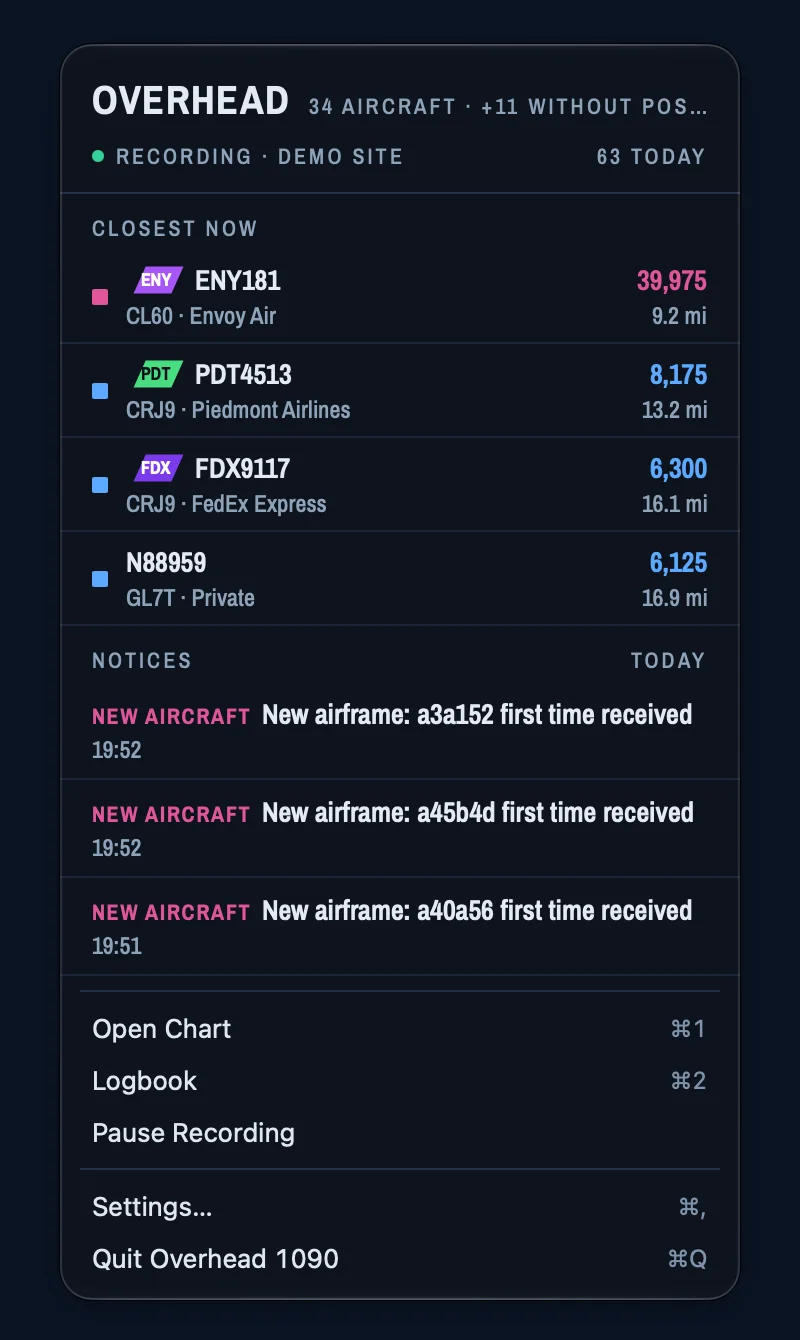
The Overhead 1090 menu-bar window: recording at the demo site, 63 aircraft today, the closest four aircraft and the latest new-aircraft notices
Records from the menu bar Logs every plane your receiver hears, window open or not. It picks up again after sleep, or can keep a desktop Mac awake to record around the clock.
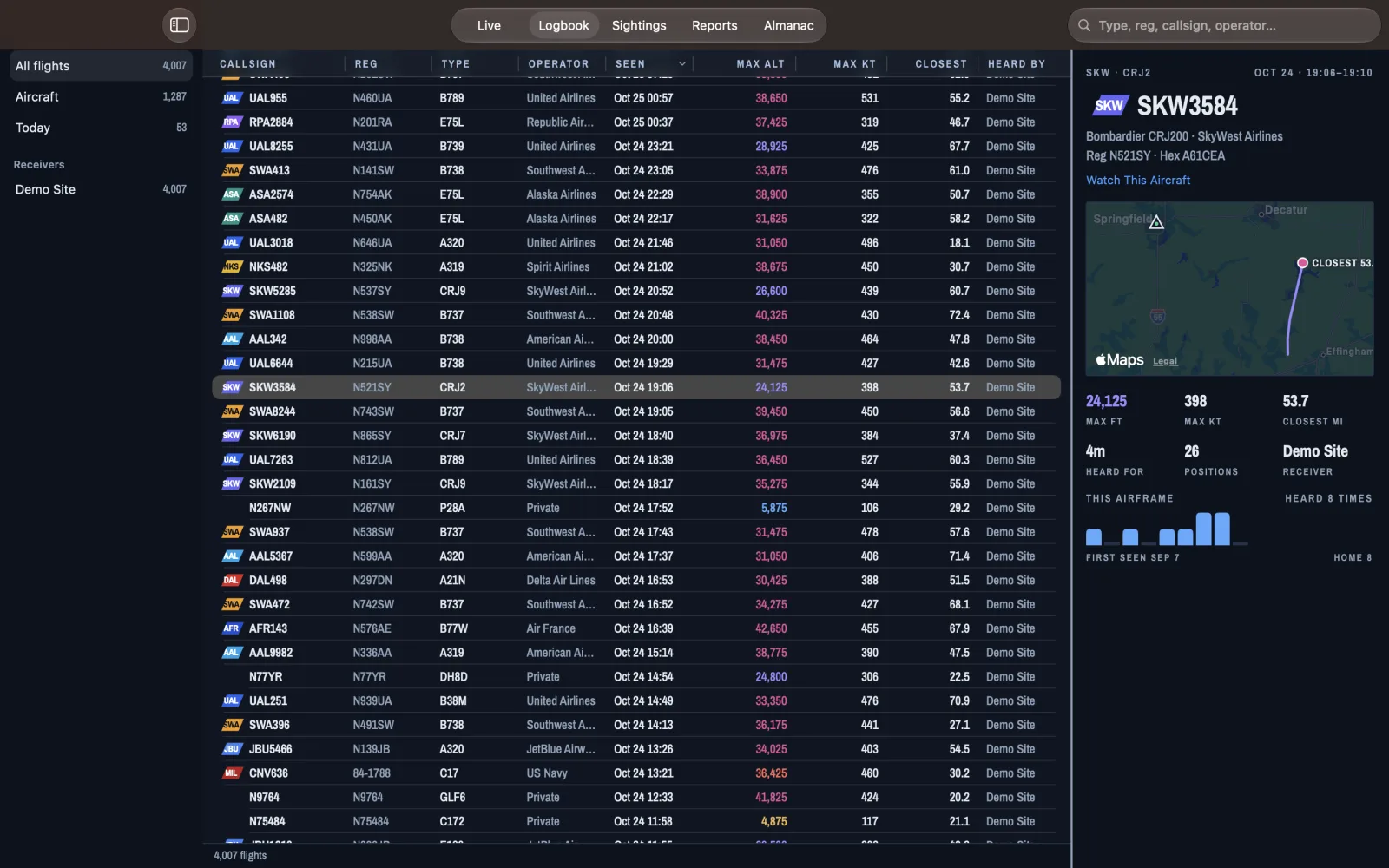
The Mac Logbook: a sortable table of 4,007 demo flights with callsign, registration, type, operator, time, altitude, speed and distance, and a detail pane for a SkyWest CRJ200
A logbook you can search Every flight, searchable by flight number, N-number, type, operator, squawk or date. Sort any column.
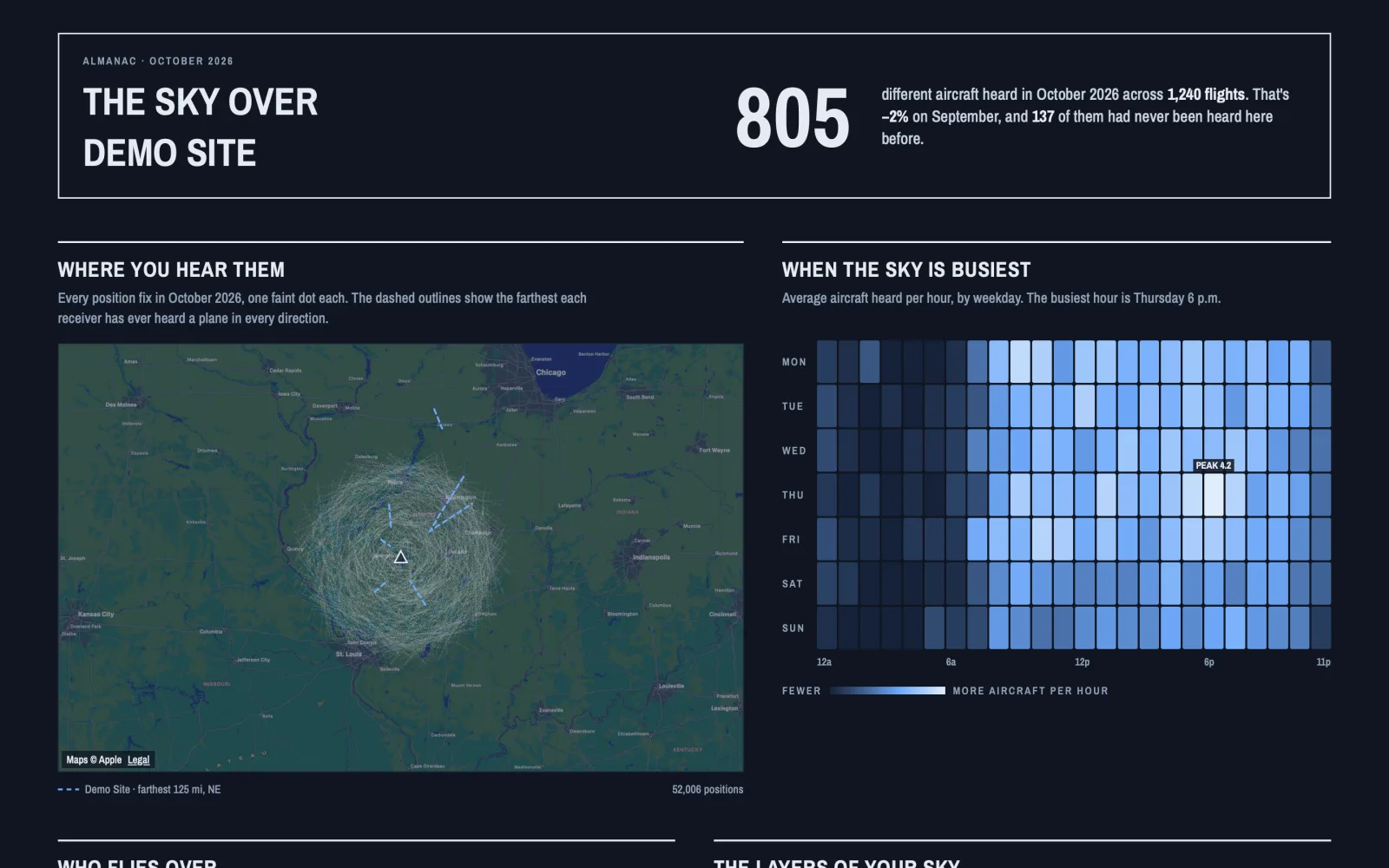
The Almanac for October 2026 at the demo site: 805 different aircraft across 1,240 flights, a map of every position heard, and a heatmap of the busiest hours by weekday
The Almanac Your sky by week, month or year: how many planes, when it's busiest, who flies over, how far you hear. Print it as a poster.
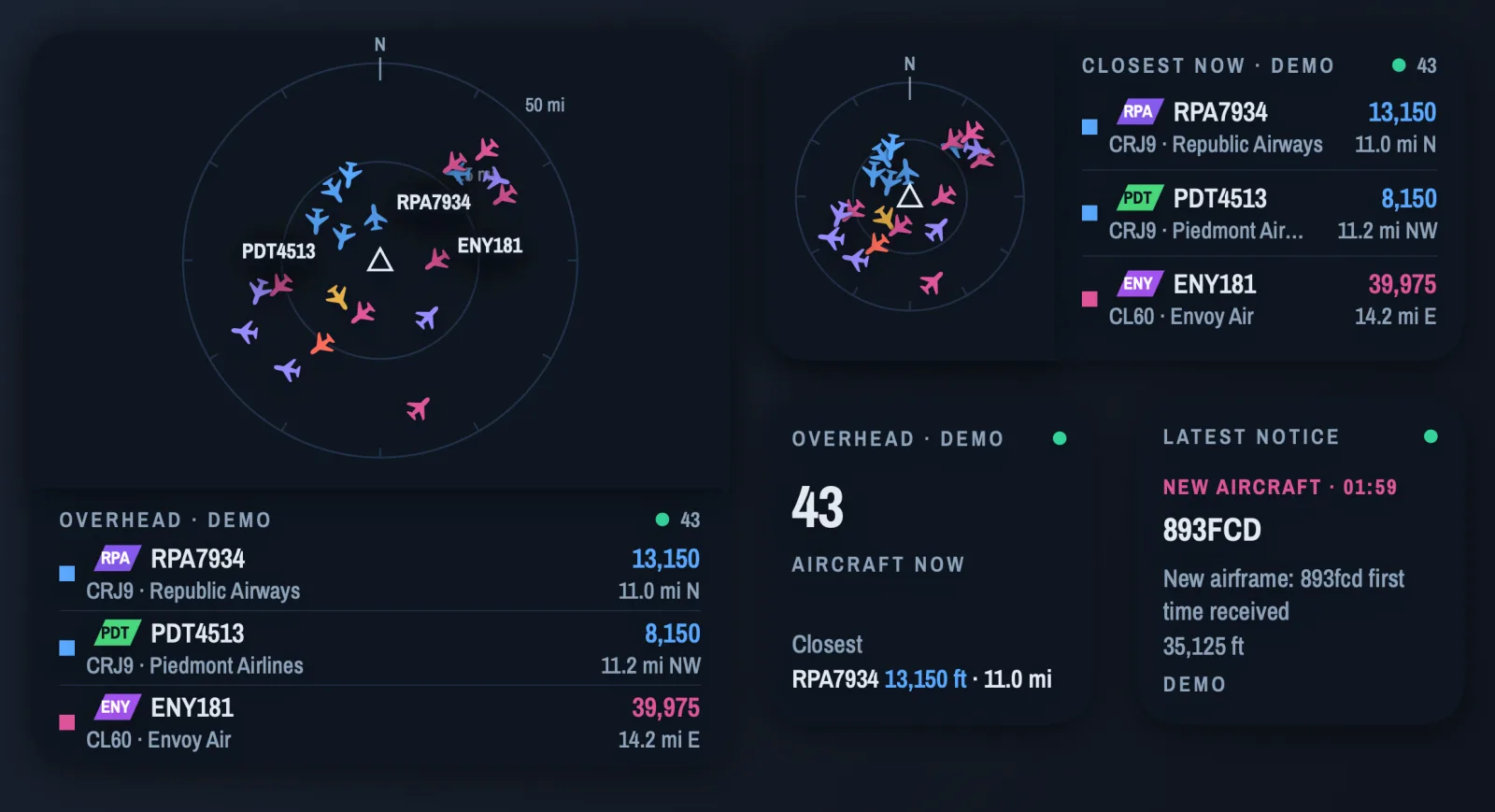
Four Overhead 1090 desktop widgets with demo data: a radar scope with the closest aircraft, a compact scope with a list, aircraft now, and the latest notice
Desktop widgets A radar scope, the closest planes, the count right now and the latest notice, on your desktop.
Get it for Mac Requires macOS 15 or later · Also: alerts and a watchlist, several receivers and locations

Part of the same purchase · Demo-mode captures at a fictional location

Capabilities

Everything your receiver hears, made beautiful.

Plane-spotting hardware deserves better than a utilitarian web page. Overhead 1090 gives your feeder the interface it always deserved.

01

Live radar map

Every aircraft your antenna can hear, rendered on a gorgeous dark map and updated every few seconds — headings, trails, and range rings around your receiver. Watch traffic pour down the airway over your roof, or catch the helicopter orbiting the next town over.

02

Aircraft HUD

Tap any target: callsign, squawk, altitude with live climb/descent rate, ground speed, heading, distance from home — plus altitude and speed profile charts drawn from its track history.

03

All your receivers, one app

Point the app at your receiver's address and you're live — and if you run more than one (the attic, the beach house), add them all and filter by who heard what. Works with dump1090-compatible feeders, including the Raspberry Pi setup you probably already run.

04

Filters & radius

Dial the detection radius from 5 to 300 km. Filter the board by airline, country, or airborne vs. ground — from "everything" to "just the interesting stuff" in two taps.

05

The living-room big board

The Apple TV app turns your largest screen into a command-center radar display. Guests will stand in front of it and point at the sky.

06

Demo mode

No receiver yet? Explore the full app with realistic sample traffic while your Raspberry Pi is in the mail.

How it works

Three steps to your own radar.

Run a receiver

A PiAware or any receiver on your network that serves dump1090-style data works — most Raspberry Pi feeder builds do this out of the box on 1090 MHz.

Works with the feeder you already run

Point the app at it

While you're home on Wi-Fi, enter your receiver's local address once. Overhead 1090 connects directly — no cloud in the middle, no account to create.

Setup time: under a minute

Watch the sky

Hear a jet? Glance at your iPhone, iPad, or the big board on Apple TV and know its callsign, altitude, and where it's headed — while it's still overhead.

Latency: seconds, not minutes

Why local wins

Internet trackers show you their sky. This is yours.

Internet flight trackers

  • Positions delayed, smoothed, and aggregated
  • Some traffic filtered or blocked from display
  • Your viewing habits are their product
  • Useless when your internet is down

Your receiver + Overhead 1090

  • Aircraft appear the moment they're received
  • Unfiltered — if it broadcasts, you see it
  • Everything stays on your own network
  • Works entirely over your LAN

Privacy

Built like it's nobody's business. Because it isn't.

No accounts. No analytics in the app. No ads. No tracking SDKs. Aircraft data goes from your antenna to your screen and nowhere else.

◆ App Privacy: Data Not Collected

Platforms

One purchase. Four screens.

iPhone

The sky in your pocket. Hear it, see it, know it — anywhere in the house.

iPad

A full-screen kneeboard radar. The dedicated spotting station your desk wants.

Apple TV

The big board. Live traffic over your house, on the biggest screen in it.

Mac

The recorder. Logs every plane from the menu bar, then lets you search all of it.

Overhead 1090 on a television with Apple TV 4K: a full-screen dark map with 41 sample aircraft, floating traffic button, and range readout
Actual Apple TV interface — demo-mode capture at a fictional location

One-time purchase · No subscription · Universal purchase across all four

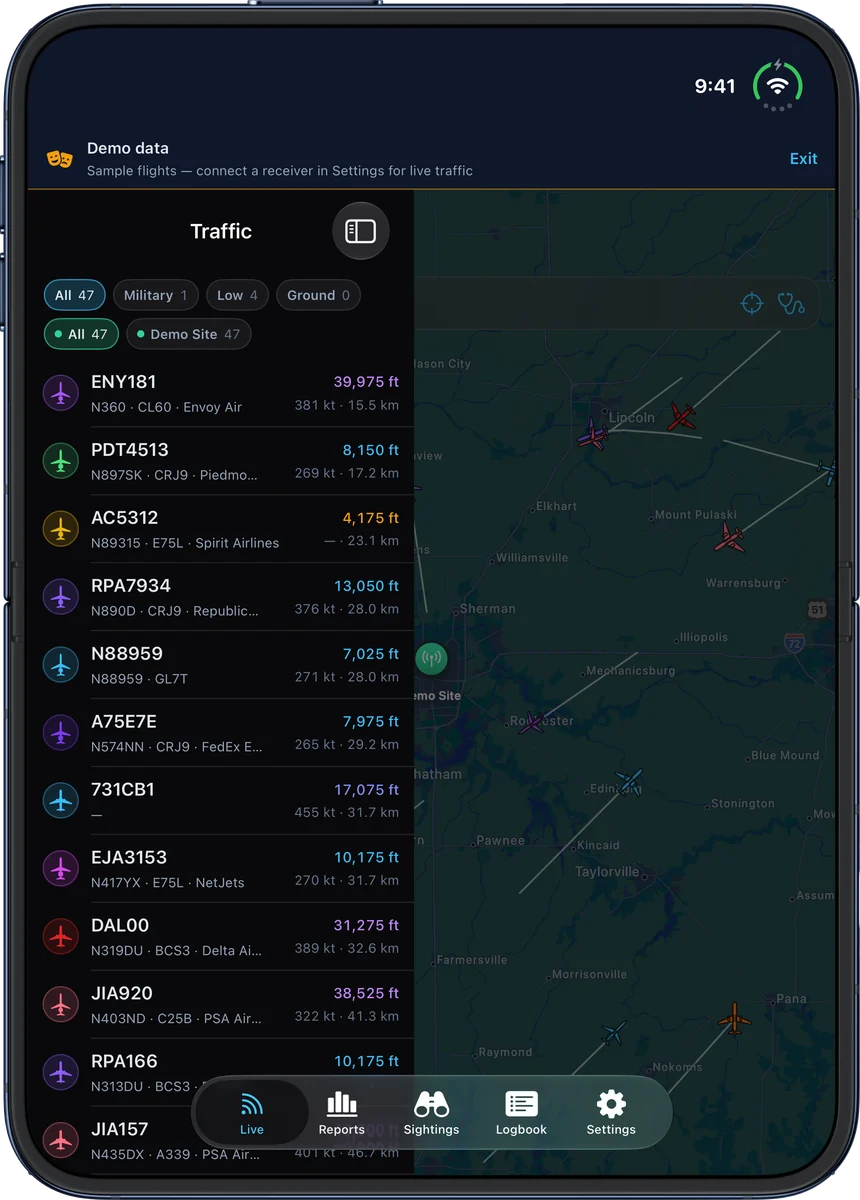
iPhone Duo

Designed for iPhone Duo.

Fold it, unfold it, half-fold it on the desk. The sky stays where you left it.

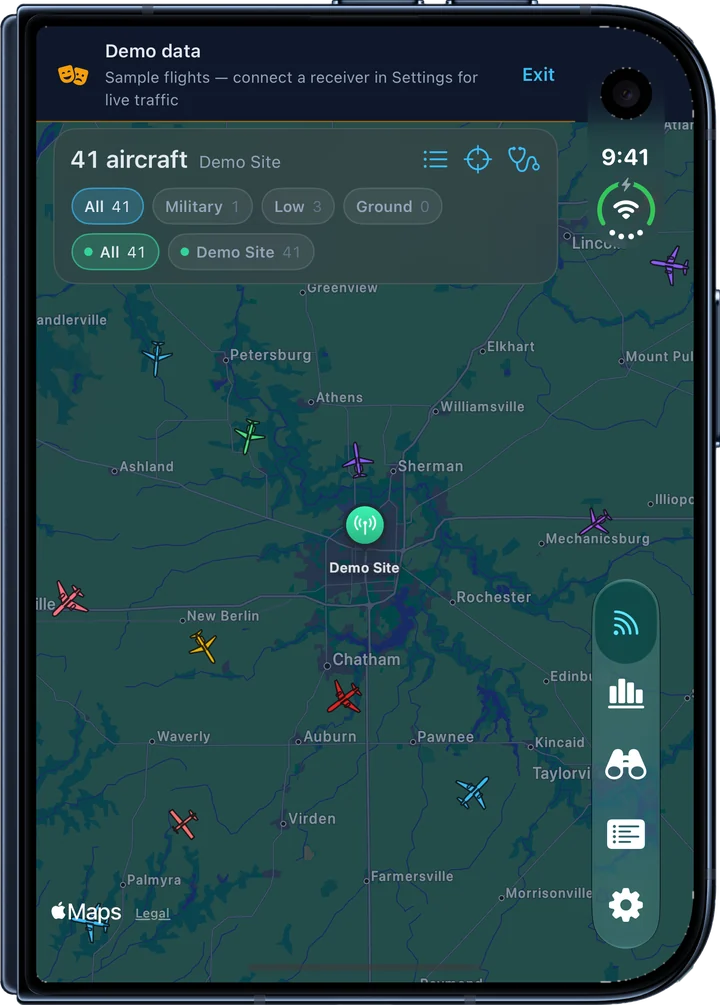
Overhead 1090 on the outer screen of iPhone Duo, closed: a live map with 41 sample aircraft
Closed The live map on the outer screen.
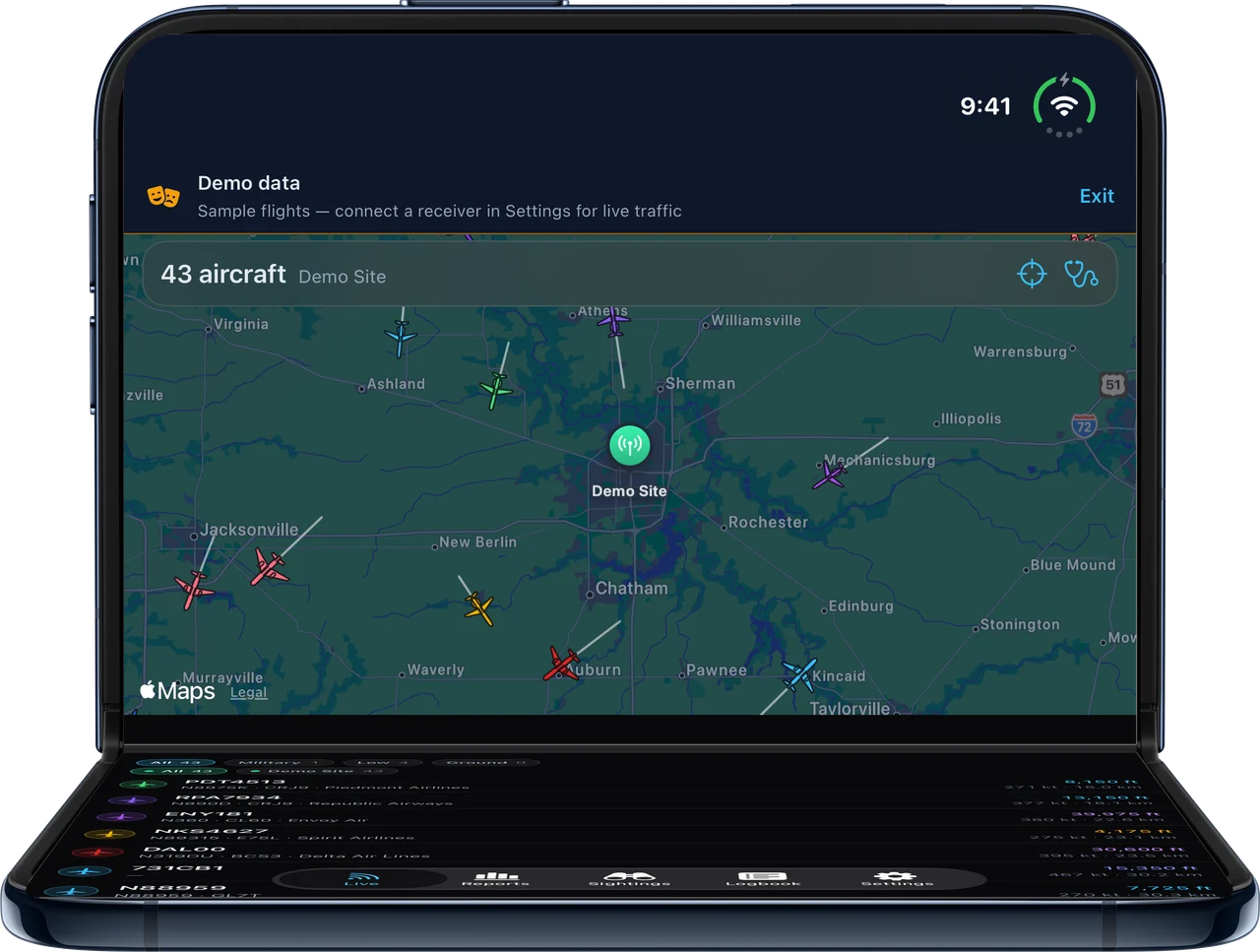
Overhead 1090 on iPhone Duo half-folded: the map on the upper panel and the traffic list on the lower panel
Half-folded Map on top, traffic below.
Overhead 1090 on iPhone Duo open flat: the traffic list beside a full map
Open Traffic beside the full map.

Part of the same purchase · Demo-mode simulator captures at a fictional location

Look up. Then look closer.

Overhead 1090 puts the sky above your antenna on iPhone, iPad, Apple TV and Mac — one purchase, all four screens.

Overhead 1090 app icon
Overhead 1090 Utilities · $4.99 · One purchase, four screens
Download on the App Store